Feb 18 2008

Forensic Marking

Tag: (i)realidad,Informática Legal — Joaquim Anguas @ 12:06 am

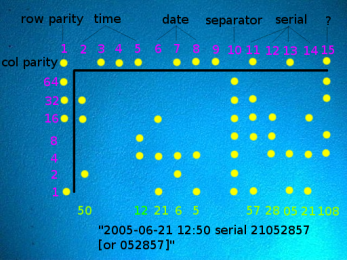
DOTSDOTS

Interesante post en theregister  dedicado a técnicas de marca forense usadas por las impresoras en color, imperceptibles a simple vista pero que permiten identificar el número de serie de la impresora y la fecha y hora de impresión.

Más detalles sobre la técnica descrita, y sobre otras técnicas y las impresoras que las implementan.


Feb 15 2008

«…Compilation 6000, This copy of Windows is not original»

Tag: Systems — Joaquim Anguas @ 8:10 pm

While implementing the solution described in the previous post, I managed to start the restore procedure using a boot media that was not the one I used to install –it was a Volume License media–

I realized and aborted before actually running the restore.

But to my surprise, after I rebooted a message appeared on the right bottom corner of the screen reading “Windows Vista TM, Compilation 6000, This copy of Windows is not original”.

I tried to validate through the web, it validated, but the message was still there, shouting “you’re a pirate! I’m telling the BSA!”.

Then I thought that what had messed all up, may in fact arrange it back.

So I just had to reproduce the same steps but with the boot media I used to install. And voilà! the message dissappeared.


Feb 15 2008

«Configuring Updates Stage 3 of 3 0%»

Tag: Systems — Joaquim Anguas @ 8:01 pm

After the last “Patch Tuesday” you may have found that some of your machines got into a lather-rinse-repeat cycle –seems that the endless loop disease catches more on Windows Vista Enterprise–

If after the update reboot you get the message: «Configuring Updates Stage 3 of 3 0% complete Do not turn off Computer» and some seconds after, the system reboots and it starts all over again, here’s a solution I have found:

From the comments, Marcus posts a solution for those who do not have a restore point or install media:

RE: Graham’s fix worked for me!

For those without an OS disc, Vista has repair tools built in.

To access them, boot the computer, but when you see the “Microsoft (C)” with the moving lines, hold the power button until it shuts down.

Now windows thinks it didn’t boot properly, and when you turn it back on, you should get the option to run Windows Startup Repair.

Choose this. When it loads, cancel the scan it starts (it won’t find anything anyway), and choose the text on the bottom that says something like “Show advanced repair options.” When it asks for the user, change from the Administrator to your user account, and then you’ll have access to a few more tools, incluing a command prompt where you can run fixes.

Instead of deleting the “pending.xml” files from the c:\windows\winsxs folder I renamed it, so that it can be put back later if needed. Hope this helps everyone else!

Thanks for sharing Marcus!

UPDATE:

Pieter shares this solution:

I have used the following solution.
Restart computer. Press f8 then choose option restore computer.
Choose option open command.
type: prompt winsxs (press enter)
type: move C:\windows\winsxs\pending.xml text.xml (press enter)
type: exit and restart computer.
Computer should be working again.
«

UPDATE:

And Spr-y has had a good experience trying this:

All i did was boot under “last known good configuration”, then install this – https://www.microsoft.com/downloads/details.aspx?FamilyID=5639710d-dfbf-4527-806e-9a1634d0cc8e&DisplayLang=en&displaylang=en , which wil apparently stop this happening again…«

UPDATE:

User Glissando posted this some days ago:

…

A follow up to my post @ 38.
It felt so good to have my computer back that I feel obliged to make it easier for anyone in my position to get there step by step,as I did. So there it goes:

  • STEP 1. As your computer restarts erratically over and over and reaches the point where you see the “(c) Microsoft” and the moving lines, hold the Power button down until it shuts off your computer completely.
  • STEP 2. Turn on computer. Now your computer is going to start in the “Windows Startup Repair” diagnostic mode. Press ENTER so that the “Startup Repair” may commence. I let it ran until the search was done and I got the message “Windows cannot repair this computer automatically”
  • STEP 3 Look down for the “View advanced option for system recovery and support” and CLICK on. You’ll be prompted to “System Recovery Option”; select your keyboard language (US) and click NEXT button.
  • STEP 4 Now you are in the “Administrator Account”. In the “User name” pop up, change “Administrator” to “user” (which is you). Than enter your usual “log in” password (if you have one on your computer) and press NEXT.
  • STEP 5 .You are now in the “Choose a recovery tool”. Go down to “Command Prompt” and CLICK on. You are prompted in to the MS DOS/ text mode.
  • STEP 6. In here simply apply Pieter magic text (as per his post @ 21):

type: prompt winsxs (press enter)

type: move C:\windows\winsxs\pending.xml text.xml (press enter)

type: exit and restart computer

  • YOU ARE DONE!

And don’t forget to backup your photos, important files and the rest on an external Hard Drive or a DVD asap!
”

Thanks!


Feb 14 2008

MOM 2005 and Windows Vista clients

Tag: Systems — Joaquim Anguas @ 7:19 pm

Third Systems post in a row, third about MS technologies, second about Vista and something you cannot do.

This post, as the previous one, has the only purpose of avoiding you wasting time trying to do something you simply can’t.

If you manage a monitoring infrastructure based on MOM 2005 and want to monitor the growing number of MS Windows Vista materializing in your network, you may like (or not) to know:

Anyway, as MS is not aware of any issue related to the installation of the MOM 2005 agent on a Vista client, I have given it a try –you’ll need access to ports 1270, 1271, 1272, 1433, 1434 and 137 TCP on the client to get it installed–

We’ll see the kind of information it can collect…


Feb 12 2008

Vista UAC and Server 2003 R2 based domain GPO

Tag: Systems — Joaquim Anguas @ 5:17 pm

By this time you may start having some (or many) MS Windows Vista computers sitting inside of your Server 2003 based domains.

If you play around with gpedit.msc on a Vista machine, you will find some policies you haven’t seen before, like the ones starting with «User Account Control» under \Computer Configuration\Policies\Windows Settings\Security Settings\Local Policies\Security Options.

If you feel the urge to centralize the enforcement for all those policies on your Server 2003 R2 based domain GPMC, and before you waste your time trying, you may be interested in this:

You can’t.


Ene 25 2008

MOSS 2007 + SSO + ISA 2006 + Office 2007 Clients Integration = ?

Tag: Systems — Joaquim Anguas @ 7:51 pm

MOSS 2007 provides a tight integration with Office 2007 client applications, allowing you to do things like open / create files from MOSS 2007 document libraries and save them right to the library itself (with a local copy in case you want to work offline). ISA 2006 offers Single Sign On (SSO) so you can embed / link other sites of yours (like OWA) on your sharepoint sites. One expects (or at least users do) that these “star” features work out of the box when he installs a server in a standard scenario, right?

Not quite so…

If you have tried that, you already know that some hacking is required in order to get all that running.

I’ve been there… that’s what you have to take into account to get the most out of your MOSS server:

Continue reading «MOSS 2007 + SSO + ISA 2006 + Office 2007 Clients Integration = ?»


Ene 23 2008

Port de Dtrace a OS X

Tag: (i)realidad — Joaquim Anguas @ 8:41 pm

Adam Leventhal, uno de los ingenieros del equipo de desarrollo de DTrace cuenta en su blog que Apple ha tenido a bien portar DTrace a OS X. Y de paso, y como quien no quiere la cosa, ha modificado el código para evitar el acceso a determinados procesos:

The notion of true systemic tracing was a bit too egalitarian for their classist sensibilities so they added this glob of lard into dtrace_probe() — the heart of DTrace:

#if defined(__APPLE__) /* * If the thread on which this probe has fired belongs to a process marked P_LNOATTACH * then this enabling is not permitted to observe it. Move along, nothing to see here.*/

if (ISSET(current_proc()->p_lflag, P_LNOATTACH)) { continue; }

#endif /* __APPLE__ */

No es que Apple no esté en su derecho, la licencia de DTrace lo permite… Pero es un asunto feo.

Continue reading «Port de Dtrace a OS X»


Ene 23 2008

El Tribunal Arbitral del COEIC resol el seu primer cas

Tag: Informática Legal,La Profesión — Joaquim Anguas @ 12:04 pm

En dates recents el Tribunal Arbitral del Col•legi Oficial d’Enginyeria en Informàtica de Catalunya ha dictat el seu primer laude; el primer d’un Tribunal Arbitral en Informàtica a Espanya.

Des de la seva creació en abril de 2005, nombroses empreses han confiat en la solvència, independència i imparcialitat del Tribunal Arbitral del Col•legi Oficial d’Enginyeria en Informàtica de Catalunya per a dirimir possibles controvèrsies en els seus contractes de Tecnologies de la Informació, incloent a tal efecte la corresponent clàusula arbitral en els mateixos.

No ha sigut fins a aquest primer cas, però, que s’ha requerit al tribunal per a resoldre un conflicte al respecte, sent aquest un cas d’entitat, amb un import en litigi de 1.200.000€.

Continue reading «El Tribunal Arbitral del COEIC resol el seu primer cas»


Ene 18 2008

DRM vs. Digital Watermarking

Tag: (i)realidad — Joaquim Anguas @ 5:42 pm

From arstechnica.


Ene 15 2008

Pon un Banksy en tu vida…

Tag: (i)realidad — Joaquim Anguas @ 1:54 am

Banksy

… por 208.100 libras, 274.000€ aprox., más el coste de llevarte / reconstruir la pared en la que está pintado.
Yo dudo mucho que se consume la puja, menos viendo el historial del ganador, pero como ejercicio está bien.

Sería interesante saber si el vendedor ha llegado a algún acuerdo con el autor …

via theregister.co.uk.


« Página anterior — Página siguiente »